


WEEX Deposit Missing a Memo or Tag? How to Request Help
WEEX Deposit Missing a Memo or Tag? How to Request Help
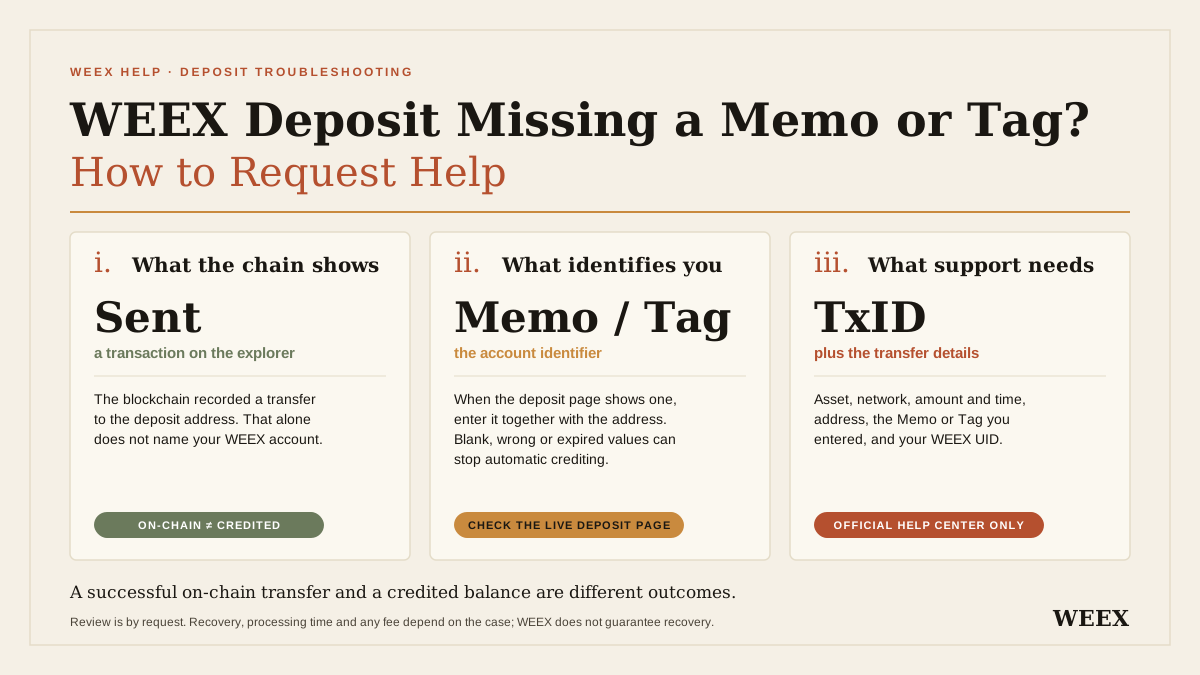
If you sent crypto to a WEEX deposit address but omitted the required Memo or Tag, entered the wrong one, or used an expired one, check the transaction status and contact WEEX support with the transfer details. A completed blockchain transaction does not necessarily mean WEEX can identify the account it belongs to. Manual review may be possible, but recovery, processing time, and any applicable fee depend on the case. Start from the WEEX Help Center and prepare your transaction hash, asset, network, amount, and account information.
A missing Memo or Tag is especially confusing because the receiving address can be correct and the transaction can still show as successful on a blockchain explorer. The practical question is whether the information sent with that transaction identifies your WEEX account. This guide helps you check the transfer, choose the right support route, and submit the details needed for a review.
Why Is My WEEX Deposit Missing After I Forgot the Memo or Tag?
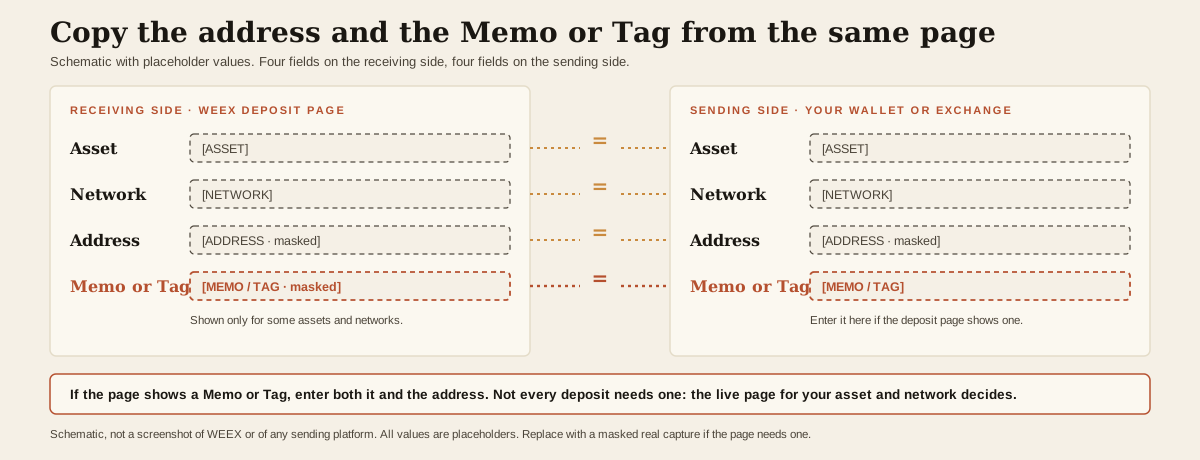
For some assets and networks, an exchange may use a shared deposit address and a separate Memo or Tag to identify the individual recipient. WEEX’s Tag/Memo guidance says that, when its deposit page displays a Memo or Tag alongside an address, you need to enter both on the sending platform. The address and Memo or Tag must come from the same WEEX deposit page.
Think of the address as directing a parcel to a building and the Memo or Tag as identifying the account inside it. The blockchain can record delivery to the address without supplying the account identifier WEEX needs for automatic crediting.
| Detail | What It Helps Identify | Where to Check It |
|---|---|---|
| Asset | The cryptocurrency you sent | Sending record and WEEX deposit page |
| Network | The blockchain used for the transfer | Sending record and WEEX deposit page |
| Deposit address | The destination recorded on-chain | WEEX deposit page and transaction record |
| Memo or Tag | Your account identifier when one is required | WEEX deposit page and sending record |
| Transaction hash or TxID | The specific blockchain transaction | Sending platform or wallet history |
A successful on-chain transaction and a credited WEEX balance are different outcomes. If the required Memo or Tag is absent, incorrect, or expired, the transfer may reach an address but fail to credit automatically. WEEX says such a case may require a manual support request; it does not guarantee recovery.
Not every deposit requires a Memo or Tag. The requirement depends on the asset and network selected. The live deposit instructions in your account are the place to check, even if you have sent the same asset before.
What Should I Check Before Requesting Help?
Follow these checks in order. They help distinguish a missing Memo or Tag from a transfer that is still pending or has another deposit issue.
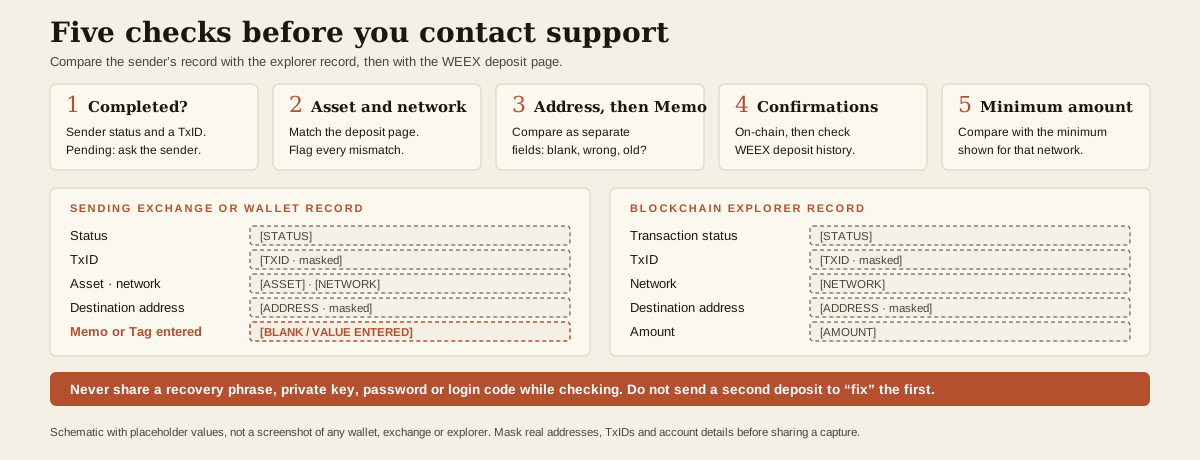
1. Check Whether the Sending Transaction Was Completed
Open the withdrawal or transfer history in the sending exchange or wallet. Find the relevant transaction and record its status and transaction hash, also called a TxID.
If the sending service still shows the transaction as pending and has not provided an on-chain hash, ask that service about the transfer first. WEEX cannot review a blockchain deposit using an unconfirmed withdrawal request alone.
If there is a hash, use it to inspect the transaction on the relevant blockchain explorer. Check the asset, network, destination address, amount, and transaction status. Do not share wallet recovery phrases, private keys, or login codes with anyone while doing this.
2. Compare the Asset and Network
In WEEX, open the deposit page for the asset you intended to receive and check the selected network. Compare it with the network recorded by the sender. An asset may be available on more than one network, and a matching token name does not establish that the correct network was used.
A wrong-network or wrong-token transfer needs a different assessment from a correct transfer with a missing Memo or Tag. WEEX’s deposit guide covers the risk of choosing the wrong chain or token; mention every mismatch you find when contacting support rather than assuming the Memo is the only issue.
3. Compare the Address and Memo or Tag Separately
Check the destination address in the sending record against the WEEX deposit address you used for that transfer. Then check the Memo or Tag as a separate field:
- Was a Memo or Tag displayed on the WEEX deposit page for that asset and network?
- Did you leave the corresponding field blank on the sending platform?
- Did you enter a different value, such as a tag copied from another account or platform?
- Did the sending platform place your text in the correct field?
Use any deposit-page screenshot or record saved at the time of transfer to explain what you saw. The current page is useful for checking the requirement, but do not assume an old address or Memo still matches what is displayed today. WEEX advises users to take the address and Memo or Tag from the same deposit page rather than inventing or reusing either value.
4. Check Confirmations and Deposit History
A transaction may need network confirmations before a deposit is credited. Check whether it is confirmed on-chain and whether it appears in your WEEX deposit history. Confirmation count and the time at which WEEX credits an account are related, but they are not the same thing.
If you are unsure which condition is causing the delay, work through WEEX’s delayed-deposit checklist. It directs users to check the transaction hash, asset, network, address, amount, and confirmations before contacting support.
5. Check the Minimum Deposit Requirement
Also check the minimum amount displayed for the selected asset and network. A deposit below the applicable minimum can have a different outcome from one delayed by a missing Memo or Tag. If both issues may apply, include the amount in your request and ask support to assess the transaction as a whole. Do not send another transfer simply to try to “complete” the first one.
Can WEEX Recover a Deposit With a Missing or Wrong Memo?
You can request a review; recovery is not automatic or guaranteed. WEEX’s official Memo/Tag article states that a missing, incorrect, or expired identifier can prevent automatic crediting. Whether a manual recovery is possible, how long it takes, and whether fees apply depend on the applicable rules and the review result.
The distinction between common situations matters:
| What Happened | What to Do Next | What the Result Depends On |
|---|---|---|
| You omitted a required Memo or Tag | Submit the completed transaction details to WEEX support | Whether WEEX can verify and handle that deposit |
| You entered the wrong Memo or Tag | Report the exact value entered and the value shown for your account | The transaction record and WEEX’s review |
| You used an old or expired Memo or Tag | Provide the transfer date and any saved deposit instructions | Whether the original deposit can be identified |
| The sending transaction is still pending | Check with the sender first and obtain a TxID if broadcast | Whether a blockchain transfer actually occurred |
| The network, token, or address was also wrong | State every discrepancy in the support request | The specific route and feasibility of review |
The table is a guide to which facts to report, not a promise that each situation qualifies for recovery. A blockchain transaction cannot be edited afterward to add or replace a Memo or Tag. If WEEX can assist, support must assess the transaction as it was actually sent.
If you think the Tag you entered may identify a different account, say so plainly in your request. Do not ask another user to return the funds or attempt to resolve the case through an unofficial contact. WEEX needs the transaction details to review what happened.
How Do I Submit a WEEX Missing Memo or Tag Request?
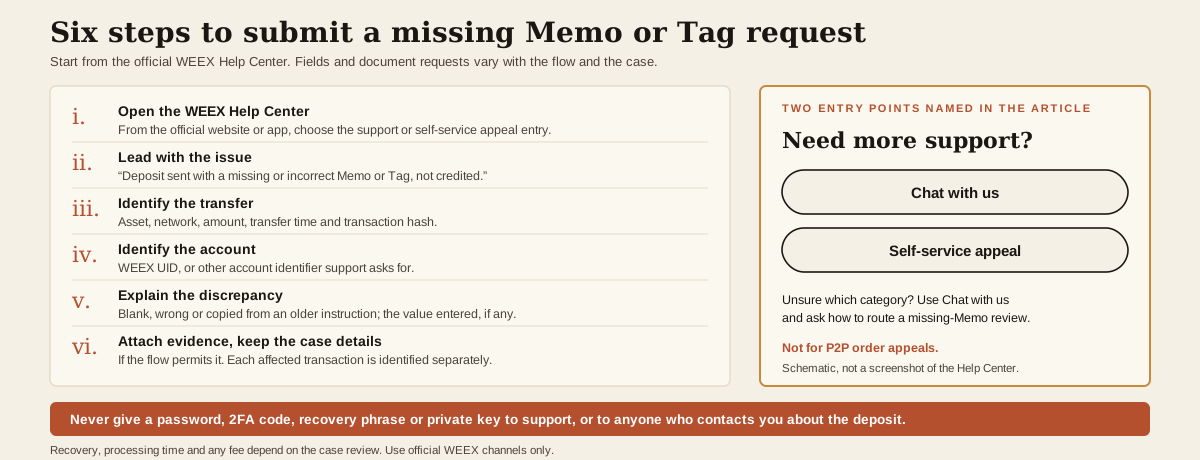
Use the support entry points on the official WEEX Help Center. Under Need more support?, the page currently displays Chat with us and Self-service appeal for issues involving accounts, assets, or transactions. You can start there, describe the missing or incorrect Memo or Tag, and follow the instructions presented for your case.
Click here to Contact WEEX 24/7 customer support
A practical sequence is:
- Open the WEEX Help Center from the official website or app and choose the available support or self-service appeal entry.
- State the issue in the first sentence: “My deposit was sent to WEEX with a missing/incorrect Memo or Tag and has not been credited.”
- Identify the transaction: provide the asset, network, amount, transfer time, and transaction hash.
- Identify your account through the official process: provide your WEEX UID or other account identifier requested by support.
- Explain the Memo or Tag discrepancy: say whether it was blank, incorrect, or copied from an older instruction, and provide the value entered if one was used.
- Attach relevant evidence if the support flow permits it, then keep the case details available for follow-up.
The exact fields and document requests can vary with the support flow and the case. If you cannot tell which category to select, use Chat with us on the official Help Center and ask how to route a missing-Memo deposit review. Avoid submitting a P2P order appeal for an ordinary on-chain deposit issue.
What Information Should I Prepare for Support?
Prepare a compact, consistent record. The list below helps support assess the issue; it is not a claim that every item is a mandatory form field.
| Information | Why It Helps |
|---|---|
| WEEX UID or requested account identifier | Identifies the account expecting the deposit |
| Asset and network | Establishes which deposit instructions apply |
| Amount and approximate transfer time | Helps match the sending record to the transaction |
| Transaction hash or TxID | Lets the transaction be checked on-chain |
| Destination address | Shows where the transfer was sent |
| Memo or Tag shown to you, if available | Helps establish the intended account identifier |
| Memo or Tag actually entered, including “blank” | Identifies the specific error |
| Sending exchange or wallet transaction record | Shows what the sender submitted |
| Relevant deposit-page screenshot, if saved | Shows the instructions you used at the time |
Check that the hash, network, amount, and address agree across your description and screenshots. An incorrect hash or a screenshot of a different transfer can slow the review. If you sent more than one affected transaction, identify each separately.
Only submit information through an official WEEX support flow. Never provide your password, two-factor authentication code, wallet recovery phrase, or private key to support or to someone who contacts you about the deposit.
How Long Does a Missing Memo Deposit Review Take? Are There Fees?
There is no reliable universal processing time or fee to quote for every missing-Memo or wrong-Tag deposit. WEEX states that recovery availability, timing, and any fee depend on its rules and the result of the review. Support can advise on your particular transaction after receiving the details.
If a case is under review, keep the same transaction hash and case details together when following up. Do not assume a blockchain explorer’s “success” label means the review has finished, and do not send a second deposit to the same address with a corrected Tag in the hope that it will retroactively fix the first. Each transfer is a separate transaction.
Be alert to anyone claiming they can guarantee recovery for an upfront payment or asking you to disclose a recovery phrase. Verify the contact path through the WEEX website or app.
What If I Forgot the Memo on a Withdrawal From WEEX?
The support route changes when WEEX was the sender. If you withdrew from WEEX to another exchange and omitted that exchange’s required Memo or Tag, check the withdrawal status and obtain its TxID from WEEX. Once the transfer is on-chain, the receiving platform is the first place to ask about crediting or a possible recovery, because it manages the destination address and account identifier. WEEX’s Memo/Tag instructions tell users to copy the address and Memo or Tag from the receiving platform’s deposit page when making such a withdrawal.
If the withdrawal has not been broadcast, check its current status in WEEX and contact official support promptly about the available options. Do not assume every submitted withdrawal can be canceled. This article’s recovery steps principally concern deposits sent into WEEX.
How Can I Avoid a Missing Memo or Tag on My Next WEEX Deposit?
Use the deposit instructions displayed for the specific asset and network you are sending. Before confirming the transfer on the sending platform:
- Select the intended asset and network in WEEX.
- Copy the deposit address from that page.
- If WEEX displays a Memo or Tag, copy it into the sender’s corresponding field.
- Compare the address, Memo or Tag, asset, and network on both sides.
- Check the deposit minimum and the sending platform’s withdrawal conditions.
- Review the final confirmation screen before submitting.
Save the address and Memo or Tag as a pair only when the sending service requires you to enter them. Do not paste a Memo from a prior transfer without checking the current WEEX instructions. If the sender’s form has no field for a required Memo or Tag, pause and ask the sending service how it supports that network before sending.
For the broader transfer workflow, see How to Deposit and Withdraw Crypto on WEEX. The live deposit page remains the source for the requirements of your chosen asset and network.
WEEX Editorial View: Check the Transfer Before Filing a Request
The fastest useful first step is to determine what actually happened on-chain. A pending sender withdrawal, an unconfirmed transaction, a wrong network, a below-minimum transfer, and a missing Memo may all appear to the user as “my deposit has not arrived,” but they require different checks. When a required Memo or Tag was omitted or entered incorrectly, give WEEX support the complete transaction record through the official Help Center. Clear evidence enables an informed review; the outcome remains case-dependent.
FAQ
1. Can WEEX Credit My Deposit If I Forgot the Memo or Tag?
You can request a manual review through the WEEX Help Center. A missing or incorrect required identifier can prevent automatic crediting, and recovery is subject to the case review. Do not treat a successful on-chain status as a guarantee that the deposit can be credited.
2. What If I Entered the Wrong Tag Instead of Leaving It Blank?
Tell support the exact Tag entered, the Tag associated with your intended WEEX deposit if available, and the TxID. An incorrect Tag needs review just as an omitted one does. Do not submit another transaction as a substitute for reporting the first.
3. Do All WEEX Deposits Need a Memo or Tag?
No. Check the deposit page for the particular asset and network. If it displays a Memo or Tag with the address, enter both exactly as instructed. WEEX notes that its examples of networks and tokens requiring identifiers are for reference; the live deposit or withdrawal page controls the current requirement.
4. What If the Transaction Shows “Successful” but My WEEX Balance Has Not Changed?
Check the network, address, amount, confirmations, deposit history, and any required Memo or Tag. A successful blockchain transfer does not prove that WEEX could automatically identify your account. Use the delayed-deposit checklist, then contact support with the TxID if the deposit remains uncredited.
5. Where Do I Appeal a WEEX Deposit With a Missing Memo?
Open the WEEX Help Center and use the Self-service appeal or Chat with us entry under Need more support? Describe it as a crypto deposit or asset issue and include the transaction details. The support flow will indicate any additional information required.
Recommended Articles
- Why Is a Tag/Memo Required for Deposits and Withdrawals? — check when an identifier is required and why leaving it blank can prevent crediting.
- What Should I Do If My Deposit Is Delayed on WEEX? — follow the wider checklist when the cause of a missing deposit is unclear.
- WEEX Exchange Deposit Guide: Prevent Asset Loss From Wrong Chains or Tokens — investigate a network or token mismatch.
- How to Deposit and Withdraw Crypto on WEEX — review the full transfer process before sending again.

Gainers


